How to Use the Elapsed Time Formula, Including Overnight
Use the elapsed time formula by converting clock times to minutes, subtracting, and adding 1,440 minutes for a known single-midnight crossing.
On this page
In computing and other time-based calculations, one of the most common formulae is that of calculating elapsed time. The elapsed time formula says that elapsed time is equal to the difference between the start and end times. This is simple to understand.
To calculate the duration of a single day, it’s necessary to convert both start and end times to minutes, subtract them, then divide by 60 to get the number of hours. In this case, you have two possible results: if the subtraction is positive, you’ve calculated the duration in terms of how many hours were involved; if it’s negative, then your answer is not what you intended. That said, there are several tricks to make the calculation work for overnight intervals as well.
This article covers all the steps, including borrowing, midnight resets and normalization, required to use the elapsed time formula correctly.
The elapsed time formula
As stated above, the elapsed time formula involves calculating the difference between the end time and the start time. One way to simplify things is to convert both times to minutes, subtracting the start time from the end time, with the next-day adjustment when needed, and dividing the result by 60 (minutes per hour).
For instance, if the interval starts at 9:50 a.m. and ends at 11:15 a.m., the calculation is:
Start: 9 hours × 60 minutes/hour = 540 minutes + 50 minutes = 590 minutes
End: 11 hours × 60 minutes/hour = 660 minutes + 15 minutes = 675 minutes
Duration: 675 minutes − 590 minutes = 85 minutes
Dividing by 60 gives you the number of hours: 85 ÷ 60 = 1 hour (whole-number quotient), with remainder 25 minutes. So the duration is 1 hour and 25 minutes.
You can do this calculation either via arithmetic or using a duration calculator with start and end time inputs.
Normalizing clock inputs
But before you proceed, you need to normalize the input data so that you can properly perform the calculation. That means converting times such as 1:00 p.m. into a 24-hour notation such as 13:00, and so on.
Let me explain the conversion process to a 24-hour format. Let’s take the noon boundary. At noon, we say that the time is 12:00, but the next day begins at midnight. For our purposes, though, it matters which side of the “noon” line we’re crossing.
Morning/afternoon conversions matter: add 12 to p.m. hours except 12 p.m., and change the hour for 12 a.m. to 00. If we convert 9:50 a.m. into the 24-hour format, it remains 09:50. Similarly, 1:00 p.m. becomes 13:00. The problem occurs when we try to cross noon. When you go from 11:50 a.m. to 12:20 p.m., for instance, it crosses over the noon boundary, but doesn’t affect your final answer.
So why does this matter? Because we treat noon as a boundary marker, like midnight.
There are two boundaries that matter: midnight (which divides one day from the next) and noon (which marks the halfway point of the day). We can define both of these as exact points in time:
-
Midnight (00:00): The beginning of a given date. Midnight occurs once every 24 hours.
-
Noon (12:00): The midpoint of a day.
Both of these boundaries are marked with 12:00. But here’s the catch: NIST warns that the labels “12 a.m.” and “12 p.m.” are ambiguous and should not be used. These labels, however, are ambiguous and aren’t considered good practice, as the term “midnight” is often used to refer to either 12:00 a.m. or the end of the previous day. There’s a more specific labeling scheme known as the ISO 8601 standard, in which times are expressed as HHMM.
If the endpoint is explicitly stated to be either noon or midnight, that’s fine. Otherwise, you can assume that any identical reading is either on the same day or a new one. But that depends upon context.
For example, if we say that a particular meeting runs from 11:50 a.m. to 12:20 p.m., that’s one duration. If we say that it’s scheduled to begin at 11:50 a.m. and last until 12:20 a.m., that’s something entirely different.
So the bottom line is that if the start time and end time match exactly, they can either occur on the same day (duration of 0 minutes) or on adjacent days (with the endpoint occurring after exactly one midnight has passed). As far as this article goes, we’ll assume that we’re trying to determine whether the end time is the next day.
When borrowing, why total-minute subtraction works
Sometimes, the ending minute field is smaller than the starting minute field. In those cases, we borrow 1 hour (60 minutes) from the end time, add it to the minute portion, and subtract 1 from the end hour.
The original example was that of a 9:50 a.m. start and 11:15 a.m. end, resulting in a duration of 1 hour and 25 minutes. Borrowing makes the calculation straightforward: 11 hours and 15 minutes minus 9 hours and 50 minutes equals 1 hour and 25 minutes.
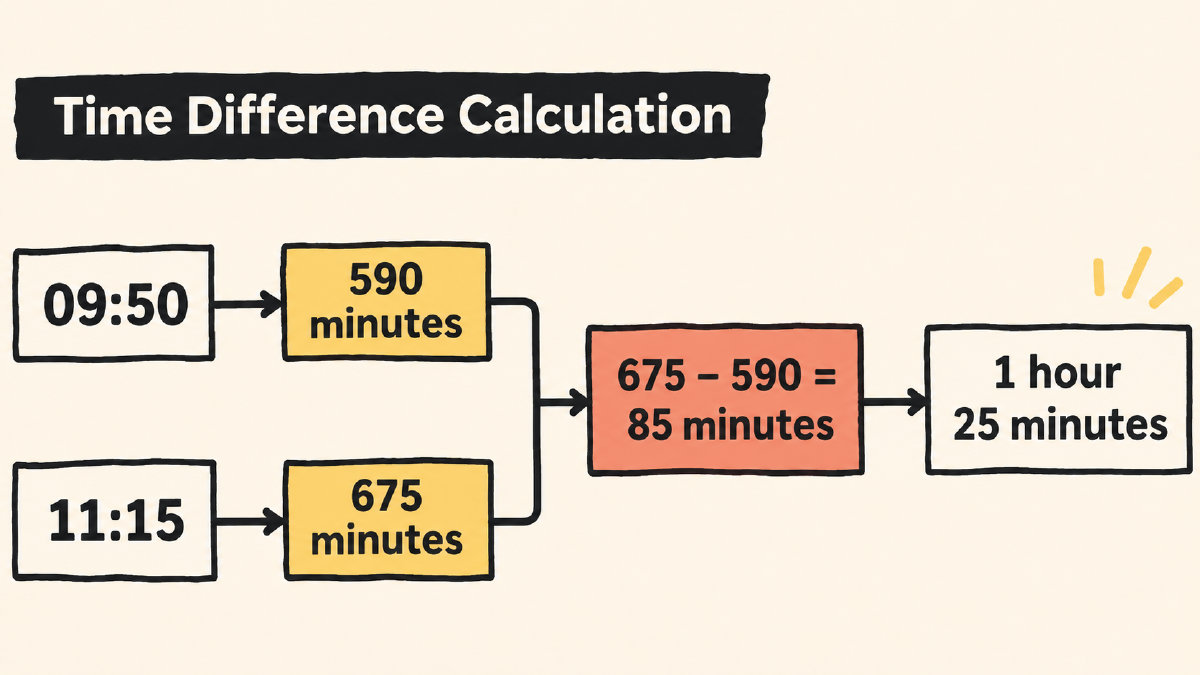
Another way to approach the problem is to calculate the total number of minutes for each time and then subtract:
Start time: 9 hours and 50 minutes
Total minutes: 9 × 60 + 50 = 540 + 50 = 590 minutes
End time: 11 hours and 15 minutes
Total minutes: 11 × 60 + 15 = 660 + 15 = 675 minutes
Subtract: 675 − 590 = 85 minutes
Divide by 60: 85 ÷ 60 = 1 hour (remainder 25)
Which shows the duration is 1 hour and 25 minutes.
So why does this work? Because we’re treating everything in terms of minutes. The only trick is to realize that a borrowed hour is equivalent to 60 minutes. It’s just a matter of accounting for the subtraction.
Clock vs decimal time
One of the problems with using elapsed time calculations is that the colon between hours and minutes can be easily mistaken for a decimal point. However, that’s incorrect.
There are 60 minutes in an hour, so a 9:50 time would be 9 hours and 50 minutes, whereas a decimal value of 9.50 would imply 9 hours and 30 minutes. Therefore, replacing the colon with a decimal point breaks the calculation.
Next-day adjustment
What happens if the endpoint is on the next day? You can still calculate the elapsed time by adding the difference between midnight and the start time, plus the difference between the endpoint and midnight.
A midnight reset is another way of looking at this: a time of 23:40 will become 23:40, but if we know that the endpoint is the next day, the endpoint is now 00:25. We need to adjust for that. How?
It turns out that a full day has 24 hours, or 1,440 minutes. So to find the elapsed time between a start and end point, we can simply subtract the two values (in minutes), then add 1,440 minutes if the endpoint is the next day.
Original example: Start time of 23:40 (1,420 minutes) and endpoint of 00:25 (25 minutes) on the next day.
Duration: 25 − 1,420 + 1,440 = 45 minutes
Without considering the next day, you might say the duration was -1,395 minutes, but that’s insufficient to establish the next-day endpoint. Identical readings on the same day give zero minutes, and identical readings on a subsequent day give 1,440 minutes. But the problem with only comparing clock readings is that we don’t know which day we’re talking about.
Instead, it’s necessary to look at both the clocks and their relationship to one another. Is the endpoint on the same day? Then the duration is 25 − 1,420 = -1,395 minutes, which indicates that the endpoint is earlier. However, if the endpoint is on the next day, the duration is 25 − 1,420 + 1,440 = 45 minutes, meaning that the endpoint is later.
Check your answer with addition
Once again, we can check the calculation by performing the reverse operation: adding the duration to the start time to see if we arrive at the stated endpoint.
Start time: 23:40
Duration: 45 minutes
23:40 + 45 minutes = 00:25
Alternatively, you can use a duration calculator to check the interval between clock readings, specifying that the endpoint is on the next day for an overnight calculation.