How 6 Minute Billing Increments Work When Rounding Up
Understand 6 minute billing increments: why six minutes equals 0.1 hour, how round-up bands work, and how they differ from actual decimal hours.
On this page
A few days ago, I wrote about how 6 minute billing increments work when rounding down. That article discussed what it means for a time period to be represented as six-minute units. In that article, we determined the following:
Ten six-minute increments equal one hour.
One six-minute increment is 1/10 of an hour, or 0.1 hours.
So, if you’re given 10 minutes in a single entry, that’s 10/60 = 0.166667 hours (or, more precisely, 1/6 of an hour). But when the time entries are billed out at six-minute increments, we’ll need to round the 0.166667 hour value to the nearest six-minute unit. That would be 0.2 hours (which equals 12 minutes).
That article was written by our contributor Jieyi, and today we’re continuing his discussion with an example where they might want to round up instead of down.
Jieyi
The first question we need to answer: under what conditions can you use the round-up arithmetic? Well, we need explicit instructions to round up; a six-minute increment alone doesn’t specify rounding direction or grouping. The supplied court chart does not establish the quoted condition. So, as a hypothetical comparison, you have two different ways that could affect your total bill: either the biller rounds up each individual time period, or combines them into groups (like combining several small durations) and then rounds up those aggregated totals.
There is another condition: a Northern District of California CJA conversion chart which indicates that “time reported in tenths of an hour” is used. This seems to tie together with the other examples, since that chart provides a contextual example (and probably doesn’t reflect a universal policy) on how to convert time into tenths of an hour.
In addition, we must consider the actual size of the increment (i.e., the six-minute band). If we don’t know the exact size of the increment, we can’t really say how the round-up will proceed. However, if we know the size of the increment and we also know the direction in which the duration is rounded, then the result is quite clear.
Let’s explore both scenarios: the simple one where we just advance through positive whole-minute bands and the complicated one involving decimal displays.
Positive Whole-Minute Bands
If we think of durations in terms of minutes, we can define nonnegative whole-minute durations as the following set of numbers:
1–6 minutes → 0.1 hour
7–12 minutes → 0.2 hour
Successive six-minute bands increase the duration by 0.1 hour.
55–60 minutes → 1.0 hour
In other words, if we simply apply the formula, then the rounded values will be unchanged if they are an exact multiple of 6. If the value isn’t an exact multiple, we round up to the next higher multiple.
We can see this in action using the function: rounded hours = ceil(minutes / 6)/10.
The ceil function means to round upward to the next integer, which is what we do when we’re working with decimals. For example, 6 minutes is exactly 6 minutes, so the number of six-minute increments is 1. Then, dividing that by 10 gives us 0.1 hours. Similarly, 59 minutes is 59/6 = 9.8333, and then ceil(9.8333) = 10; 10/10 = 1 hour. On the other hand, 60 minutes would yield 10.0 increments (10/10=1 hour).
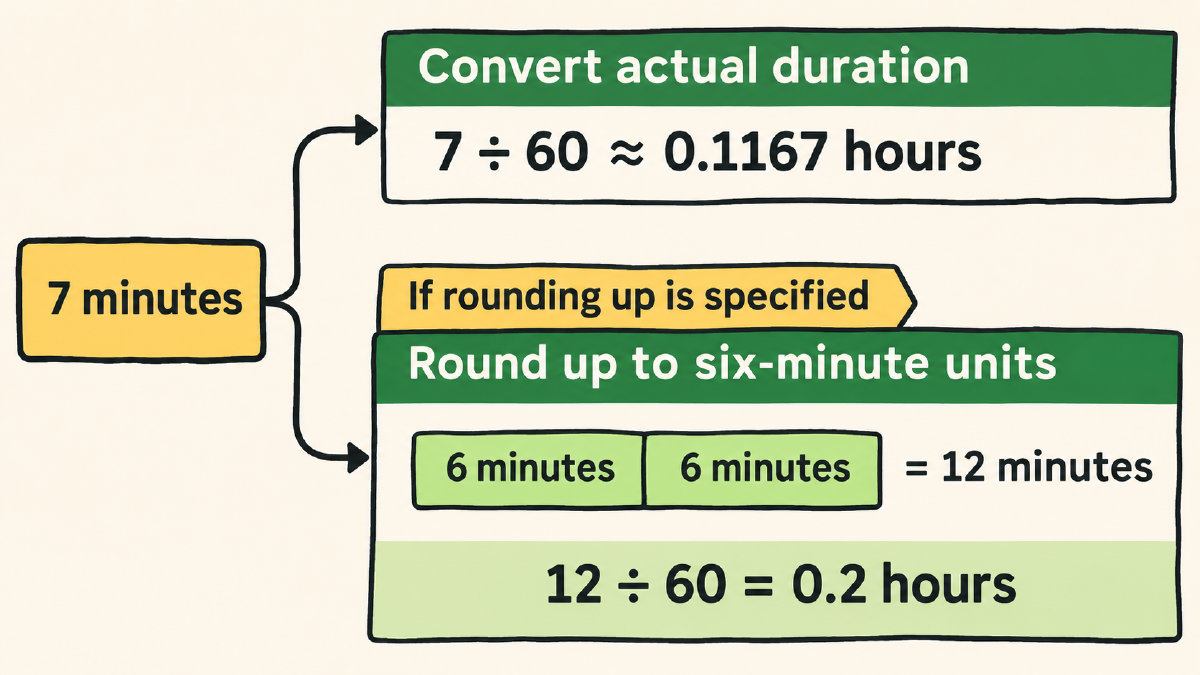
Now let’s compare some boundary results against ordinary decimal conversions to understand why rounding a duration to an increment differs from rounding its decimal display.
Boundary Results
If you look back at the original problem, there are three possible durations: 6 minutes, 7 minutes, and 60 minutes. Let’s compute these:
6 minutes = 0.1 hours
7 minutes = 0.116667… hours (which is approximately 0.1167 hours)
60 minutes = 1.0 hours
However, when you apply the rounding procedure that we’ve already outlined, the durations become:
6 minutes = 0.1 hours
7 minutes = 0.2 hours
60 minutes = 1.0 hours
With our assumed round-up rule, 61 minutes gives us ceil(61/6)/10 = 1.1 hours. So, the same arithmetic continues past one hour.
This suggests that rounding the decimal representation to an increment is slightly different than the actual arithmetic performed when rounding the entire duration.
To demonstrate this, we can compute the decimal representations of these durations:
6 minutes → 6/60 = 0.1 hours
7 minutes → 7/60 = 0.116667… hours
But wait! Rounding a duration to a six-minute increment and rounding its decimal display are separate operations. We can express the duration in decimal hours without rounding it; rounding that display to a chosen number of decimal places is optional.
Grouping
Now, let’s look at what happens when you change grouping. A hypothetical set of three entries: three separate two-minute entries. What’s the effect?
Well, if we round each entry individually, the result is: 0.1 + 0.1 + 0.1 = 0.3 hours.
On the other hand, if you add the times before rounding, the result is: 2 + 2 + 2 = 6 minutes, which is 0.1 hours.
Comparing these two approaches reveals something interesting. They differ because of the way the rounding procedure is structured. There’s no prescribed grouping policy in this situation, although the service-category totals instruction does provide a hint: “each service category should be totaled separately.” However, the service-category totals instruction does not explicitly settle the hypothetical entry-grouping question.
In reality, however, you may end up with an actual record of the time entries. The instructions specify whether the total amount of time should be calculated separately for each service category, or whether the total amount of time should be grouped by category. It’s unclear whether such a distinction applies to short time intervals within the same category.